Banglarbhumi West Bengal Land Records & Services: Full Guide
Banglarbhoomi is the West Bengal government’s digital platform for accessing land records and property-related services online. It allows users to find Khatian and plot information, check RS-LR plot records, use the Know Your Property facility, view available land details, track mutation and conversion applications, request Records of Rights (ROR), and access land revenue-related services. By bringing these facilities into one online system, Banglarbhumi makes it easier for property owners, buyers, and other users to find relevant land information and monitor applications without depending entirely on traditional office-based processes.
What Is Banglarbhumi.gov.in and How Does It Help With Land Records?
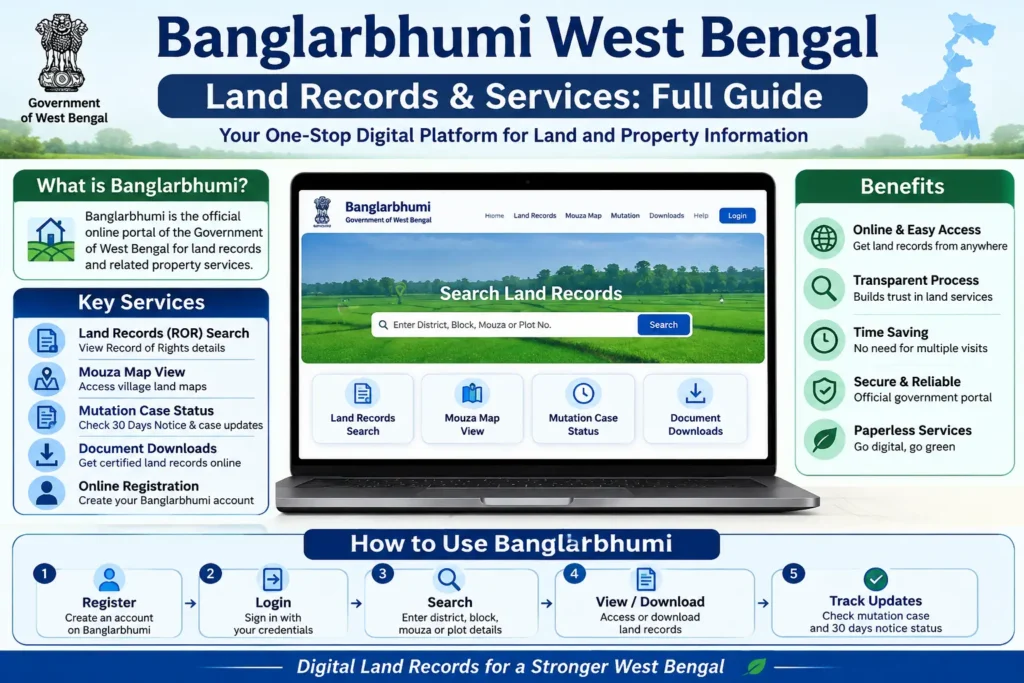
Banglarbhumi.gov.in is the West Bengal government’s online platform for managing and accessing land and property records. It is operated by the Land & Land Reforms and Refugee Relief and Rehabilitation Department and provides digital access to important information related to landholdings, including Khatian and Record of Rights (RoR), plot details, land area, ownership-related records, property information, and Mouza maps.
The portal was introduced to make land administration more accessible by moving many record-search and property-related processes from traditional paperwork to an online system. Property owners, prospective buyers, and other users can use the available services to examine land records, verify relevant property details, follow mutation-related applications, and access other eligible land services. By providing these facilities through a centralized digital platform, Banglarbhumi helps make West Bengal’s land-record system more convenient and transparent for citizens.
Mouza Map Request on Banglarbhumi: Online Process and Benefits

The Mouza Map Request service on Banglarbhumi allows eligible users to apply for land or Mouza map-related records through the online portal instead of depending entirely on physical visits to land offices. After signing in with a registered account, users can access the Service Delivery section and select Mouza Map Request from the available options, alongside services such as ROR and Plot Map requests.
The portal may display a security or cybercrime disclaimer before the request process continues. Digitizing map and land records makes it easier for citizens to access relevant property information while supporting more organized record management and helping reduce risks associated with misplaced documents, fraudulent records, and unnecessary paperwork.
How to Check Land Classification and Verify Property Details on Banglarbhumi
The Land Classification service on Banglarbhumi helps users identify the recorded classification and related code of a particular parcel in West Bengal. To access this information, visit the Banglarbhumi portal, open Citizen Services, and select Land Classification. Choose the relevant district from the available options to view the applicable classification details. Checking land classification can be useful when researching a property because the recorded category may provide important context about how the land is documented. Before purchasing land, buyers should also examine available Khatian, plot, ownership, and other property records to compare the information and identify any discrepancies before proceeding with a transaction.
How to Check Property Value Using Khatian or Plot Information on Banglarbhumi
Banglarbhumi provides the Know Your Property facility through which users can search available West Bengal land and property records using a Khatian number or plot details. To begin, open the Banglarbhumi portal and select Citizen Services, followed by the Know Your Property option. The search generally requires selecting the relevant district, block, and Mouza, after which users can choose whether to search by Khatian Number or Plot Number.
Enter the required property details and submit the search to view the information available in the government record system, which may include applicable land or property value and other registered particulars. The portal also provides access to several related services, including Khatian and plot information, RS-LR records, land conversion, land classification, mutation applications, GRN search, and application reprinting, making it a central platform for checking and managing various West Bengal land-record requirements.
How to Use Know Your Property and RS-LR Information on Banglarbhumi
The Know Your Property service on Banglarbhumi helps users find available property information by selecting the relevant district, block, and Mouza and then searching with either a Khatian Number or Plot Number. After submitting the required details, the system displays the property information available in its records, which can assist users in researching land before a transaction or verifying existing particulars. Banglarbhumi also provides an RS-LR Plot Information facility for connecting older and current plot references.
Users may search using Sabek Dag to Hal Dag (RS Plot to LR Plot) or the reverse Hal Dag to Sabek Dag (LR Plot to RS Plot) option, making it easier to relate corresponding plot numbers across different land-record systems. Together, these services help property owners, buyers, and other users examine relevant land records through a centralized digital platform.
How to Check Banglarbhumi Mutation Status Online in 2026
How to Check Mutation Plot-Khatian Status by Khatian
How to Fill Out a Banglarbhumi Grievance Application
How to Check 30 Days Notice Mutation Case

How to Apply for Land Conversion on Banglarbhumi
How to Fill a Warish Application on Banglarbhumi
Banglarbhumi 2026: Key Online Services
Apply online by entering applicant, transferor, property, and deed details, uploading required documents, and saving the reference number after submission.Access to online learning resources, training programs, and workshops.
SchoolFee Payment Administration:
Use Online Application → Fee Payment to pay applicable charges for Mutation, Conversion, Certified Copy, Plot Information, or Plot Map services.
Check application or payment details through Application GRN Search using the GRN number, application number, and captcha.
Retrieve and print a previous application receipt by entering the request type, application number, and captcha.
Generate or reprint challans through the eChallan Services section using the required application or challan details.
The mobile app provides access to selected services such as Khatian, Plot Information, LR-RS records, fee details, officer information, and mutation status
How to Install the Banglarbhumi App on Android or iPhone
Android
Open the Google Play Store, search for “Banglarbhumi,” and check the app details before selecting Install. Once the installation is complete, open the app and follow the available instructions to access supported land-record services.
iPhone
On an iPhone, open the Apple App Store and search for “Banglarbhumi.” If an official app is available, verify its publisher before downloading and installing it.
Important Note
Before installing any Banglarbhumi-related application, make sure it is published by the authorized government department and avoid unofficial apps that may use similar names.
How to Sign Up for Banglarbhumi Online

Frequently Asked Questions About Banglarbhumi
Conclusion
Banglarbhumi has made West Bengal land-record services more accessible by bringing various property-related facilities into a single online platform. From checking Khatian and plot information to tracking mutation applications, viewing RS-LR records, submitting eligible applications, and accessing other land services, users can complete many routine tasks digitally. By keeping property details accurate and following the required online procedures, citizens can use Banglarbhumi more efficiently for their land-record and property-related needs.